
See your real equity drawdown.
Every minute. Every account.
Balance drawdown is what your broker shows you. Equity drawdown is what your account actually went through. PortQuant tracks it minute by minute, attributes it to the strategies that caused it, audits every fill, and alerts you the moment your rules are breached — on dashboards you build yourself.
Live today · 5 days before first charge · Cancel any time
Why this matters
The balance curve isn't telling the whole story.
One real account on PortQuant. 29 strategies. Profitable on the balance curve. Half the equity gone at peak — invisible to anyone watching only balance.
Account A. Profit on the balance curve: +$10,523. Hidden risk multiplier: 8.5x. And it's not unusual — across PortQuant accounts, 72% of live MT4/MT5 accounts show equity drawdown worse than balance drawdown.
What you get
Detection that matches what your account actually went through.
See the real drawdown across the portfolio. Drill into any account. Attribute it to the strategies behind it. Audit every fill. Set the rules you want enforced. Get alerted the moment they're breached. All on dashboards you build yourself.
See it
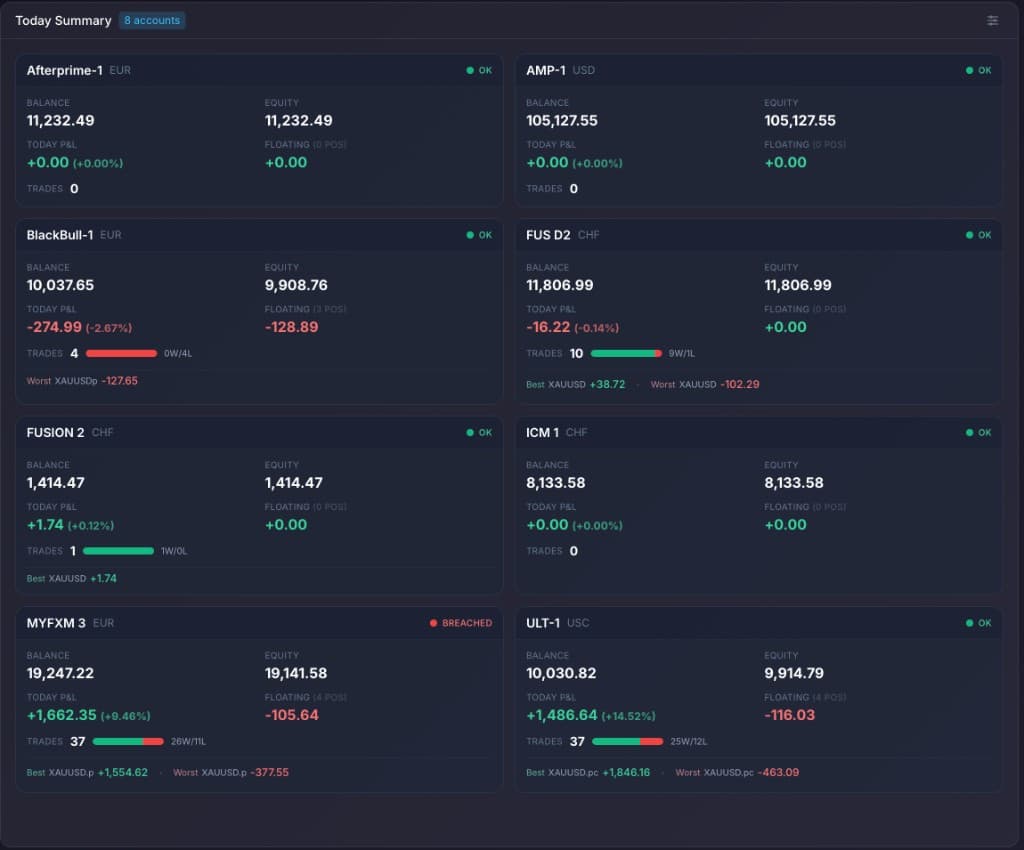
Live equity drawdown across every account
- A single dashboard for every connected MT4 and MT5 account — balance, equity, and the gap between them at a glance.
- Live floating P&L on open positions, refreshed every minute. See what your account is currently going through, not just what it survived after positions closed.
- Per-account today P&L, open position count, trade count with win/loss split, and best / worst trade of the day.
- Risk status badge per account — OK or BREACHED against the rules you have configured.
Drill in
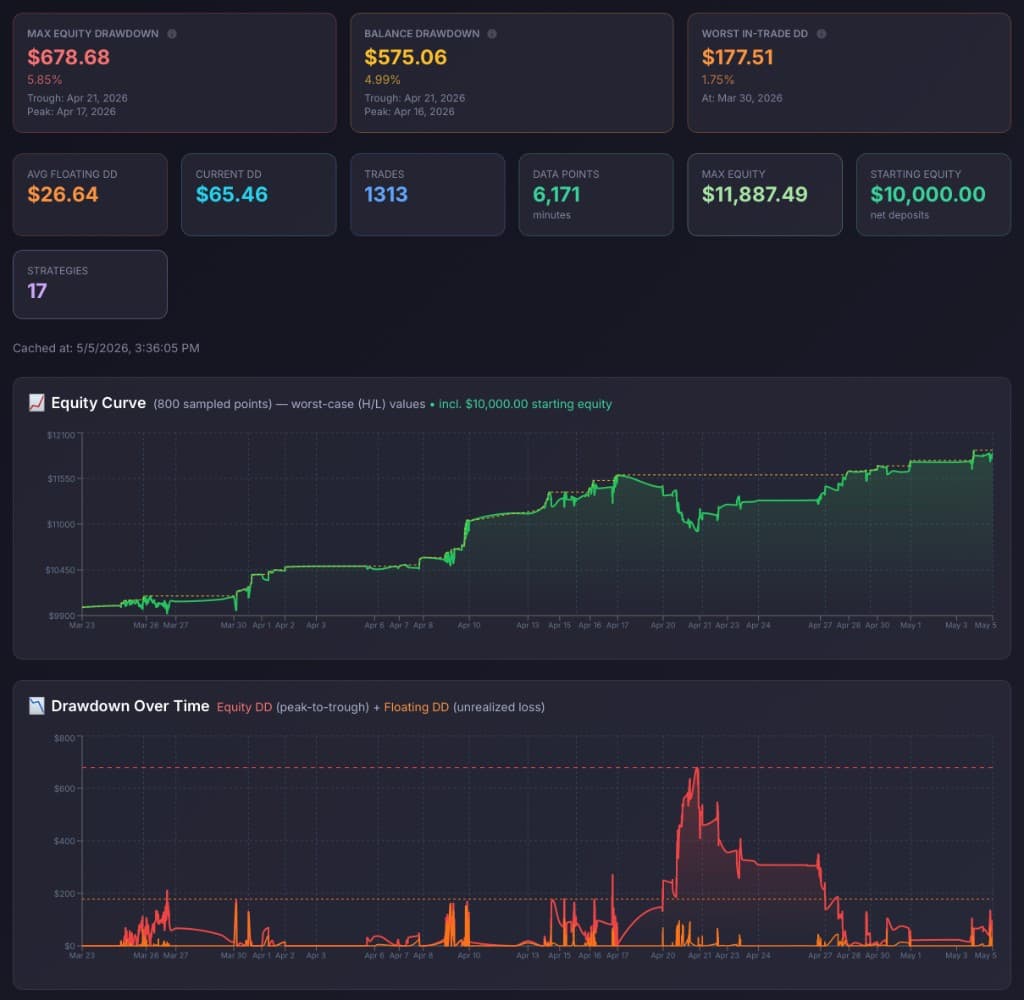
Open any account. Equity DD and Balance DD side by side.
- Max Equity DD and Balance DD shown as two separate top-line numbers — never averaged, never confused. Plus Worst In-Trade DD as a third lens.
- Average Floating DD, current DD, trade count, total data-point minutes, starting and max equity — full per-account telemetry on one page.
- Sampled equity curve with peak / trough markers, plus a Drawdown-Over-Time chart overlaying Equity DD (peak-to-trough) and Floating DD (unrealized loss).
- Same drill-down available at the strategy level — every individual EA gets its own equity curve, DD time series and KPI block.
Attribute it
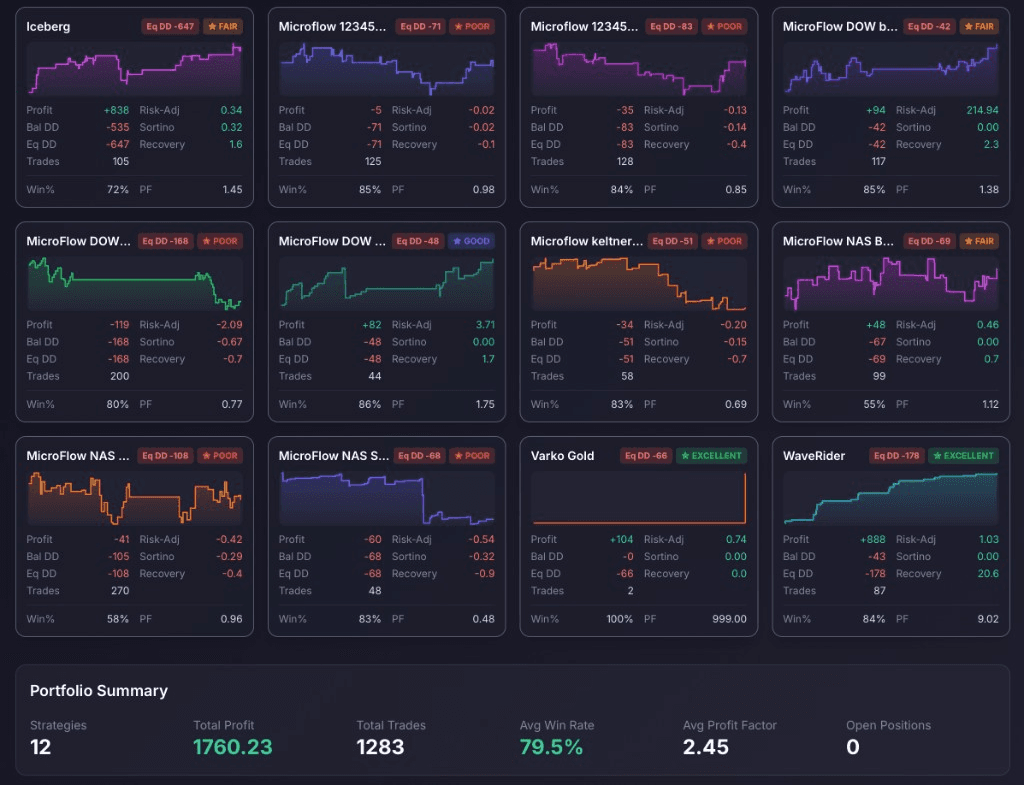
Pinpoint which strategies caused the damage
- Every connected strategy on a single grid, each with its own equity drawdown, profit, win rate, profit factor and mini equity curve.
- Magic-number resolution: every order tagged back to its strategy automatically.
- Risk-adjusted metrics — Sortino, recovery factor — alongside the raw P&L, so a profitable strategy with a brittle drawdown profile can't hide.
- Define your own forward-performance thresholds. Strategies are tagged POOR / FAIR / GOOD / EXCELLENT against your live data — not somebody else's benchmark.
Audit every fill
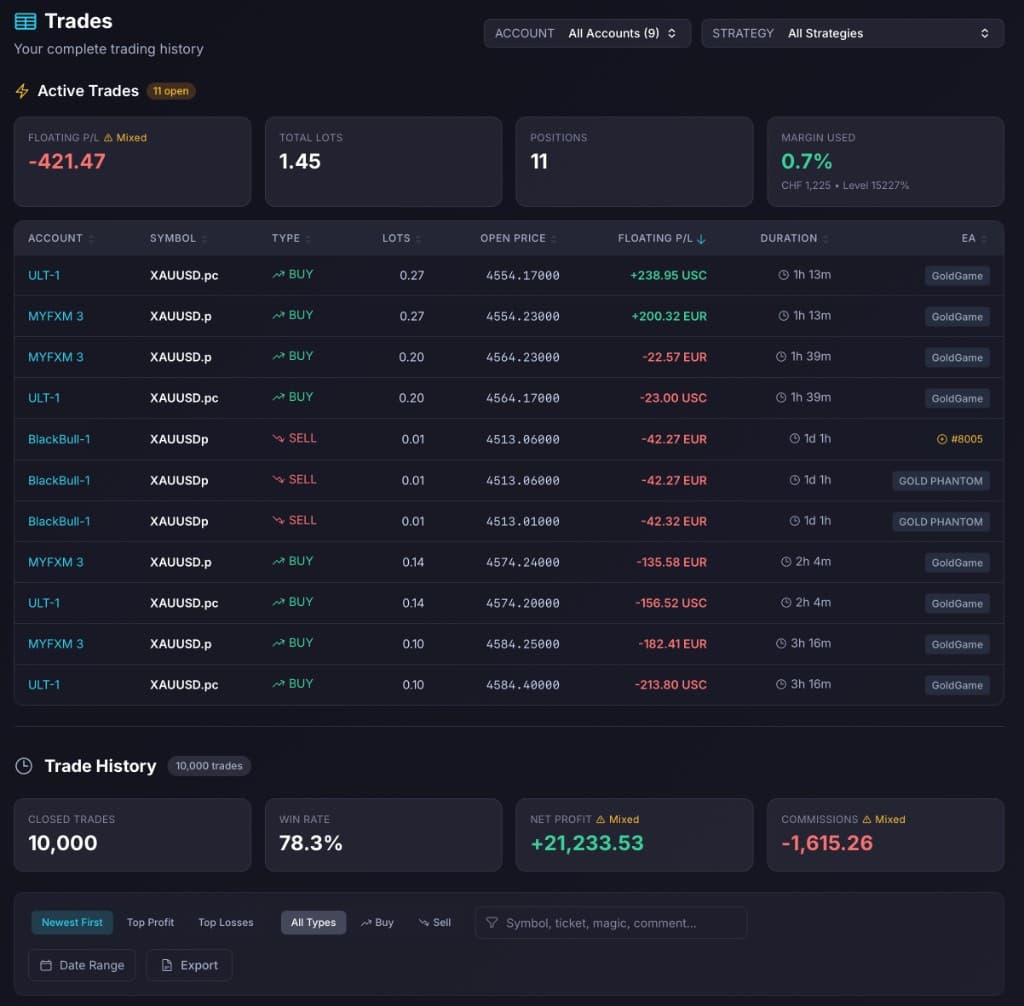
Every open and closed trade in one ledger.
- Active Trades and Trade History on a single page — across every connected account, every strategy, every broker.
- Sort by any column. Filter by date range, type, top profit, top losses — or free-text search on symbol, ticket, magic number, or comment.
- Each trade carries the strategy you assigned to its magic number. Unmapped magics still surface as raw numbers — never silently dropped.
- Mixed-currency badges on portfolio totals (Floating P/L, Net Profit, Commissions) — multi-broker reality made obvious instead of silently summed in dollars that don't exist. CSV export with the filters you have on screen.
Set the rules
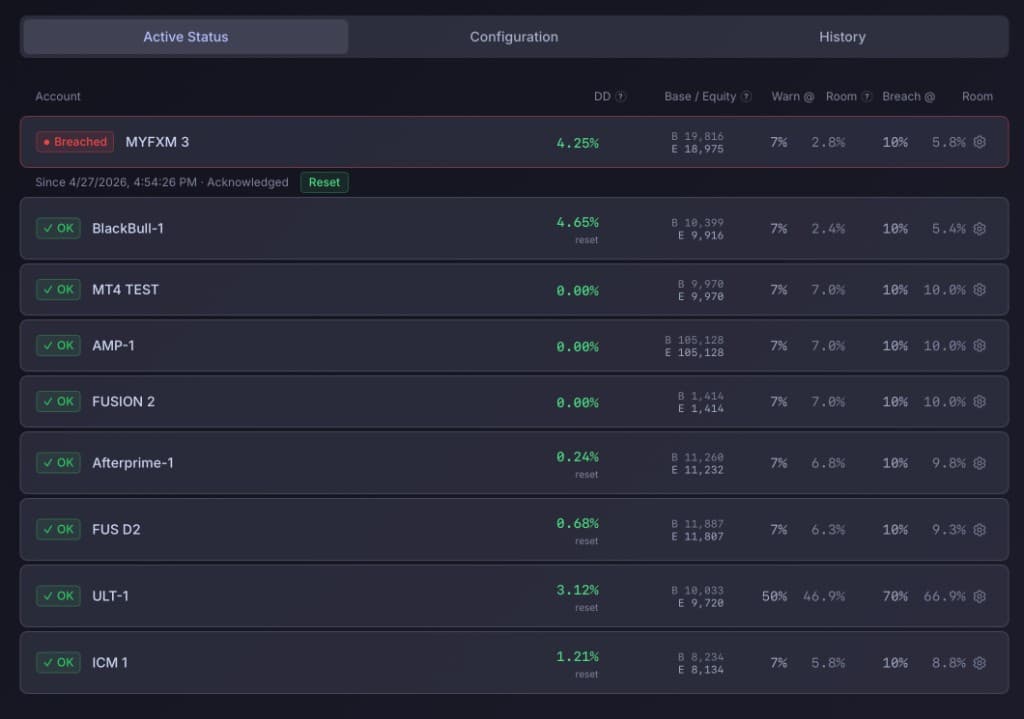
Set the rules. Track every account against them.
- Per-account Warn and Breach thresholds in % of equity. A default you set once, with per-account overrides where it matters.
- Live equity drawdown alongside your thresholds, plus the headroom — how much room each account has before the next warning.
- Acknowledge a breach to silence repeat alerts on the same event. Reset when the account clears and you want a fresh peak.
- Persistent: rules survive restarts, re-installs and broker reconnects. All configured from the dashboard — no MQL code.
Get alerted
Webhooks: Portfolio EngineeringAlerted on every breach. And again when it clears.
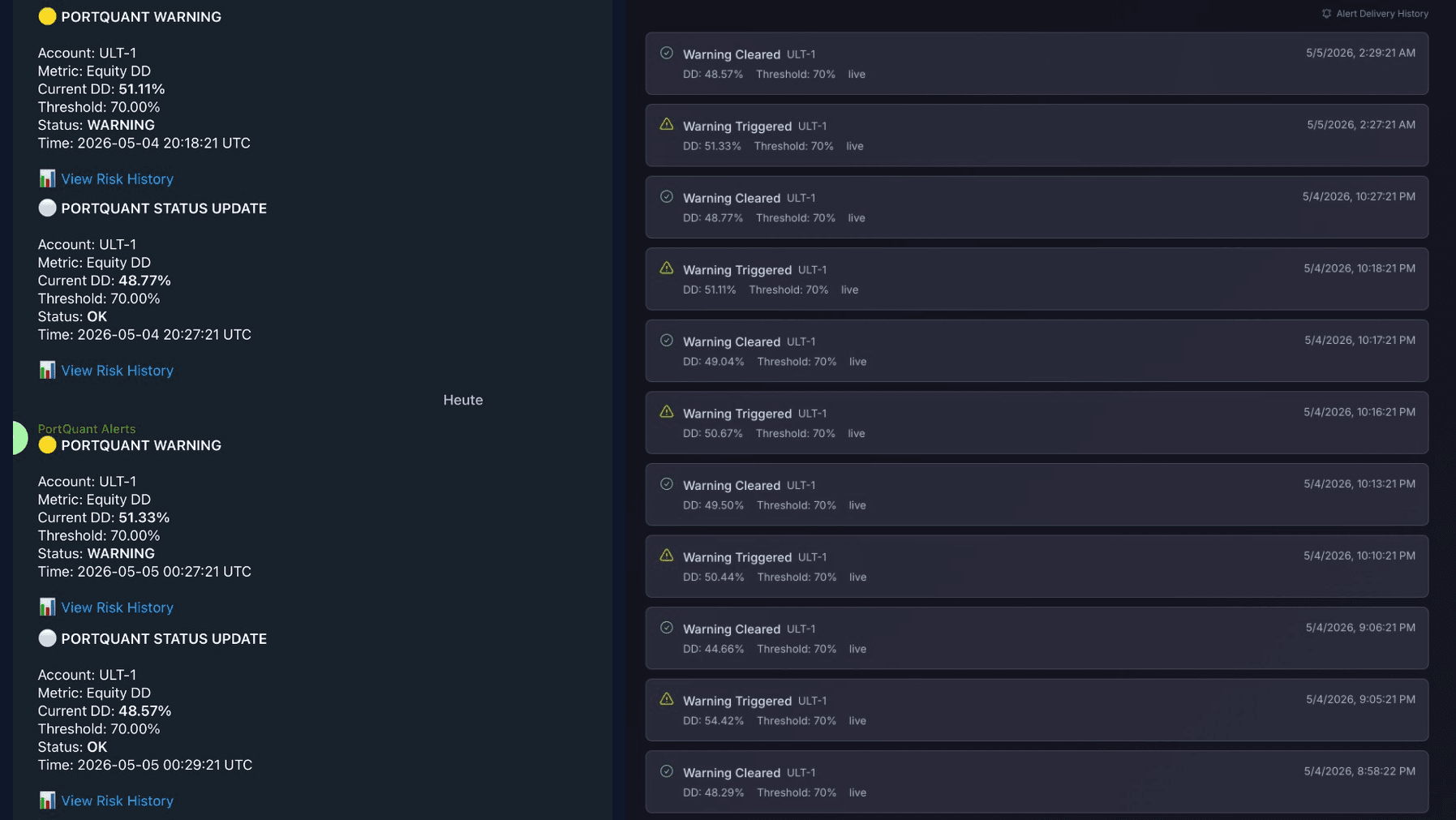
- Real-time Telegram delivery to your phone or a private group — both when a rule trips and when the account clears.
- Every alert names the account, the metric, current DD, threshold, and timestamp — with a one-tap link back to the dashboard.
- Full audit trail in the Monitoring · History tab. Every triggered, cleared, and acknowledged event with timestamp and DD value, live or backfilled.
- Webhook endpoints for downstream automation (Slack, Discord, custom systems) on the Portfolio Engineering tier.
Compose it
Build the dashboard you actually want. As many as you need.
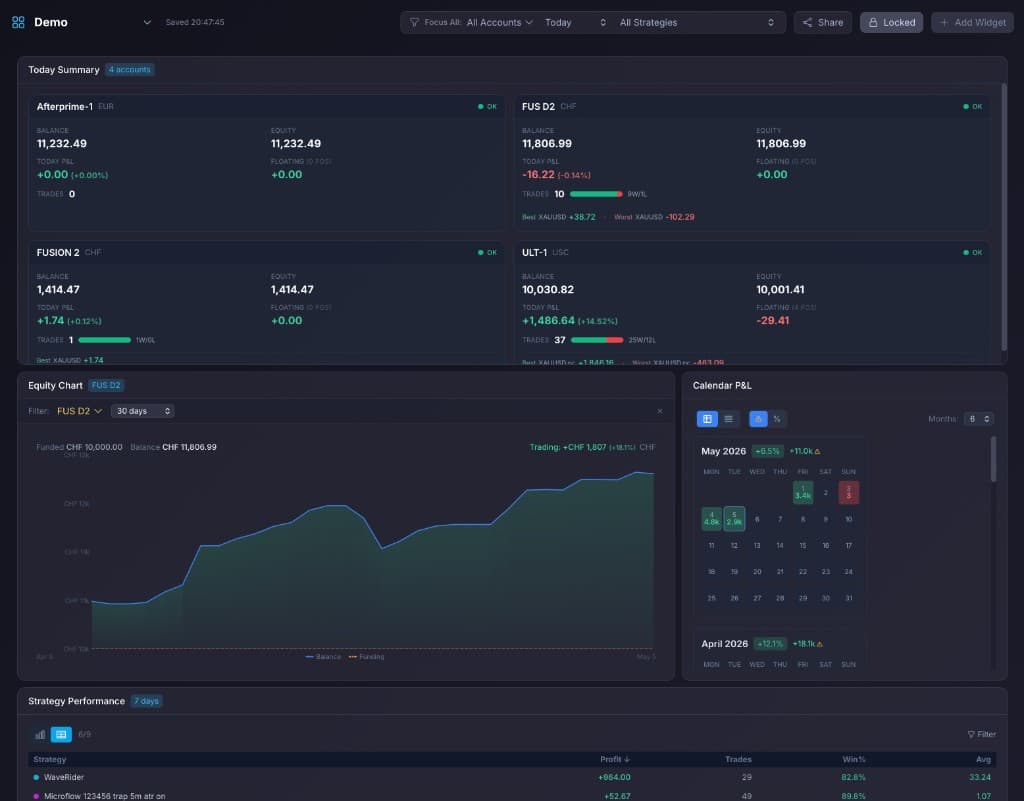
- Multiple named dashboards — switch with one click. A demo board, a production board, a per-broker board, a per-strategy board: build whatever lens you actually want to look at.
- Sixteen widgets in the library: Today Summary, Account Summary, Account Health, Equity Chart, Period P&L, Monthly Performance, Calendar P&L, Strategy Performance, Strategy Exposure, Symbol Breakdown, Active Positions, Recent Trades, Winners / Losers, Quick Stats, Economic Calendar, Clock.
- Each widget mixes charts and numbers — equity curve plus today's P&L, calendar heatmap plus monthly totals, strategy grid plus mini equity sparklines.
- Global focus controls (account, period, strategy) apply across the whole board. Autosaved as you drag, lockable when you're done editing.
- Any dashboard can be flipped to a public read-only URL — anyone you send the link to can open it without a PortQuant account. Useful for prop-firm reviewers, signal subscribers, or just being transparent with your audience.
Also worth knowing
Magic numbers, mapped to strategy names. Once.
- Auto-Detect pulls strategy names from order comments — most modern MT4/MT5 EAs are mapped without you typing anything.
- Global mappings cover every account; per-account overrides handle the edge cases without breaking the global view.
- Unmapped magic numbers always surface in a dedicated panel — never silently merged into “Other”.
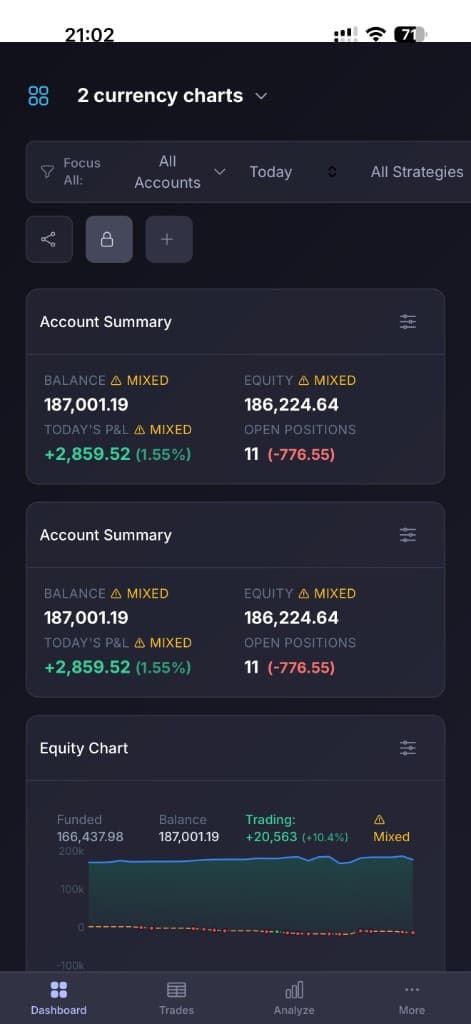
Same dashboards. Built for the phone too.
- Mobile-first responsive layouts — widgets reflow to a single column with full-resolution charts.
- Tab bar for fast switching between Dashboard, Trades and Analyze views on the move.
- The same boards, focus filters and locked layouts you set on desktop — no separate app, no separate config.
How it connects
Read-only collection. No broker credentials.
A lightweight Collector EA attaches to each MT4/MT5 account and streams trade ticks and equity snapshots to PortQuant over an authenticated channel. We never see your broker credentials, and the EA cannot place, modify, or close orders. Read-only by design.
Looking for automated enforcement?
Auto-flatten on breach lives one layer up.
Risk Control measures and alerts. When you want positions closed automatically the moment your rules are breached, that's the Aegis Portfolio EA — a local guardrail that runs in your terminal and flattens positions under thresholds you set.
Aegis Portfolio is bundled with Portfolio Engineering — and is coming to the MQL5 marketplace as a standalone EA. The simpler Aegis Account Protector is already on MQL5 today.
Everything on this page is included at the Portfolio Engineering tier.
Resources
Read more on equity drawdown.
Equity Drawdown vs Balance Drawdown: What MT4/MT5 Traders Miss
Balance drawdown only tracks closed trades. Equity drawdown includes floating P&L and reveals risk that balance curves hide. How PortQuant reconstructs it from M1 candles.
Read articleArticleWhat Is Maximum Adverse Excursion in Forex Trading?
Maximum Adverse Excursion (MAE) measures the worst drawdown during an open trade. How to calculate it, optimize stop losses, and combine it with MFE for trade analysis.
Read articleArticleMonte Carlo Simulation for Forex Risk Analysis
Standard Monte Carlo misses floating drawdowns and breaks on grid strategies. How PortQuant's equity-aware simulation reveals the risk others hide.
Read articleCommon questions
How does PortQuant connect to my MT4/MT5 accounts?
A lightweight Collector EA you install on your terminal sends equity, balance and trade data over an encrypted channel using a per-user API key. PortQuant never sees your broker login or password and never places trades — the connection is strictly read-only.
What's the difference between equity drawdown and balance drawdown?
Balance drawdown only updates when trades close. Equity drawdown reflects what the account is worth right now, including floating losses on every open position. Across 100+ live MT4/MT5 accounts, equity drawdown averages 2.1x balance drawdown and reaches up to 8.5x. The gap is the underwater stretch a broker statement quietly hides.
Do I need to write any MQL code to set risk thresholds?
No. Per-account Warn and Breach thresholds are configured from the dashboard as percentages of equity, with per-account overrides. The system shows live equity DD beside each threshold plus headroom to the next warning, and an acknowledge/reset workflow. Settings persist across terminal restarts and reconnects.
What happens to alerts if my MT terminal disconnects?
The disconnect is flagged on the affected account with a stale-data badge so a flat curve cannot be confused with a missing feed. The Telegram alert pipeline keeps running on the last received equity values; on reconnect, history is backfilled and any missed-window state recomputed.
Can I export my data, and what happens to it if I cancel?
CSV/Excel export is included on every paid plan with on-screen filters preserved, so the file matches what you see in the UI. After cancellation your account data remains available for 30 days for re-subscription, then is purged. Earlier deletion can be requested at any time.
Stop trading on a curve that isn't telling you the truth.
Connect your MT4/MT5 accounts, see your real equity drawdown within minutes, set the rules you want, and get alerted before damage compounds.